ServiceM8 and Pestgrid
Connect ServiceM8 and every job your team unlocks on Pestgrid turns up in ServiceM8, ready to quote. Finish the job in ServiceM8 and we mark it done on Pestgrid. For pest control businesses in Australia.
What you need
- A Pestgrid pro account. Only an owner or admin can connect ServiceM8.
- A ServiceM8 account you can sign in to. ServiceM8 says creating jobs may incur charges on your ServiceM8 account, so check your plan if you’re not sure.
Connect
- In Pestgrid, go to Integrations and find ServiceM8.
- Select Connect ServiceM8, sign in to ServiceM8 and allow Pestgrid.
- You’re back on Integrations, and the card says Connected.
Starting from Pestgrid in ServiceM8’s add-on store works too. Sign in to Pestgrid, or create a pro account, and you go straight on to step 2.
What goes into ServiceM8
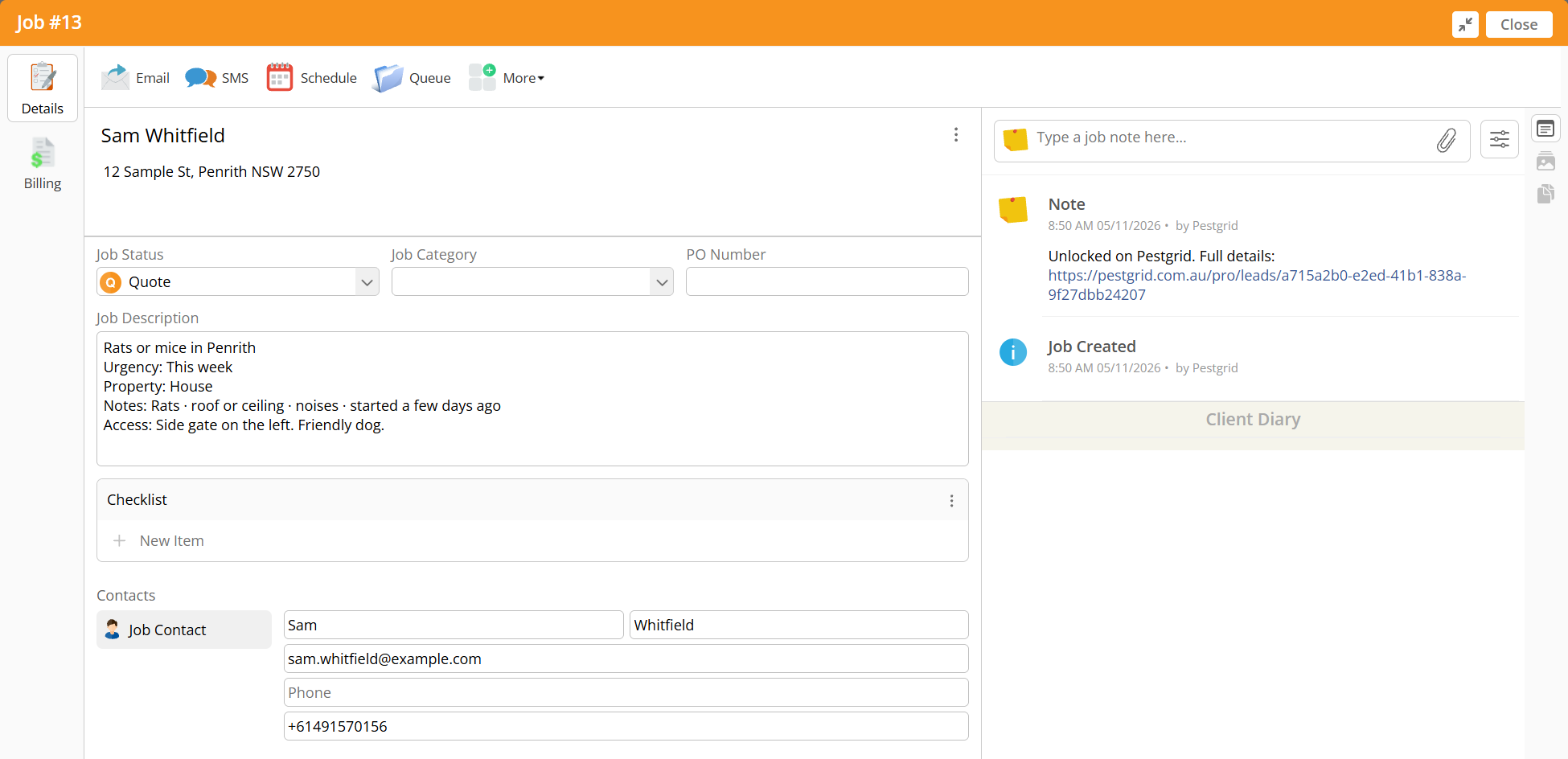
Each time someone on your team unlocks a job, we create:
- a client, with the job address
- a job at Quote status, with the pest, urgency, property type and the customer’s notes
- the customer as the job contact, with their mobile and email
- the customer’s photos
- a note that links back to the job on Pestgrid
A customer who comes back keeps the same client. If you already have a client with their name, we add their suburb, like “Sarah Kim (Richmond)”.
We only act on jobs that came from Pestgrid. The rest of your ServiceM8 account is left alone.
Quotes and bookings
Send your quote from ServiceM8 as you normally would. When the customer accepts it through ServiceM8’s link, or you accept it for them in ServiceM8 after a phone call, we ask them on Pestgrid to confirm they booked you, with your quote’s total. Once they do, the job shows as booked.
For a job you didn’t quote in ServiceM8, use the “… booked me” button on the lead in Pestgrid.
What your customer sees
What you see on the lead
Finishing a job
Mark the job Completed in ServiceM8. We check it with ServiceM8, mark it done on Pestgrid, and your customer gets their review request. If they haven’t confirmed the booking yet, we wait and finish it as soon as they do.
Job completed
Job completed on 5 November 2026
Settings
On the ServiceM8 card in Integrations, an owner or admin can:
- turn off “Create a ServiceM8 job when we unlock” to pause new jobs
- disconnect. Jobs already in ServiceM8 stay there.
If a job didn’t go across, open the lead and select Send to ServiceM8 again.
If it stops working
If ServiceM8 stops accepting Pestgrid, the card says Needs reconnecting and we email your owners and admins. Select Reconnect and allow Pestgrid again.
Your data
Our Privacy Policy covers what we send to ServiceM8 and what it tells us. We keep the access ServiceM8 gives us encrypted, and delete it when you disconnect.
Help
Email hello@pestgrid.com.au.